Sunday, August 23, 2015

Samsung Galaxy Tab 2 P3100 Power Button Ways Solution

Samsung Galaxy Tab 2 P3100 Power Button Ways Solution Problem Jumper
This solution provides the connection line paths of the Samsung Galaxy Tab 2 7.0 GT-P3100 Power ON-OFF/END switch button key. This may help fix if the phone doesn’t tuns ON but it shows charging indication when the battery charger is plug-in.
Besides that, a problem in power button might also cause your phone to restart at times, which becomes very much annoying and it troubles you to the masses.
Just refer to the solution below and locate the highlighted components where the said power on off key is being connected.
Samsung Galaxy P3100 Power ON OFF Key Jumper Ways Solution
Samsung Galaxy Tab 2 P3100 Power Button Ways Solution
When it comes to hardware, the very first thing that you need to do is to re-solder power button strip and check its on-board connector for any loose contacts.
Samsung P3100 Power Button Ways Solution
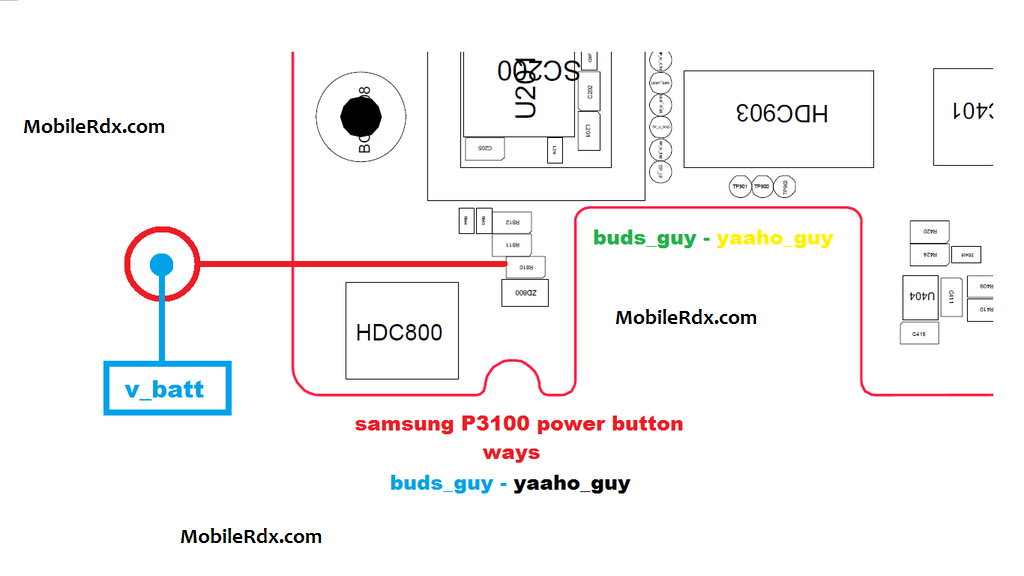
The first step that should be done is certainly the damage caused on the power button on the phone can not turn on, to make sure the power button is broken, you can try charging or charging the phone whether it is charging or not. If you can try the second charging.
The second step you can check the track as in the picture above, check the lines one by one and also the resistor is connected on the power switch on, if there is a path-breaking try doing jumper carefully and thoroughly.
Damage or fault repairs caused by the existing solutions on this blog is not liable MobileRdx.com, we just want a little help you in improving your mobile phone.
Samsung Galaxy Tab 2 GT-P3100 Power Button,Power Key,Power Switch,On Off Button, On-Off Switch, Power Problem

Samsung SM-T111 Charging Solution Ways Usb Jumper


Samsung SM-T111 Charging Solution Ways Usb Jumper
Samsung Galaxy Tab 3 T111 Usb,Charging,Problem,Solution,Jumper,Ways
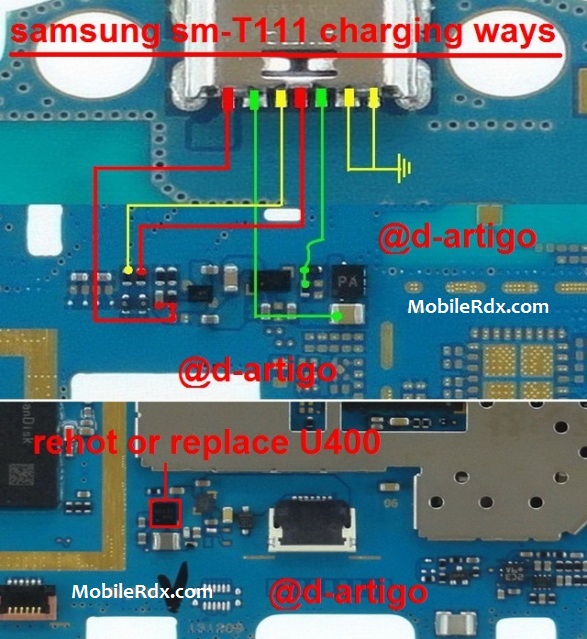
The solution below will work if you already tried another working battery charger but still it doesn’t show any charging indication. This solution shows and called the Samsung SM-T111 charge jumper ways. Just refer to the solution below and locate the highlighted components on the Samsung Galaxy Tab 3 T111 PCB board.
Samsung SM-T111 Charging Solution Ways Usb Jumper
Here’s how to troubleshoot the Samsung SM-T111 charging problem:
1. First, try to use another working battery charger and replace the mobile phone’s battery.
2. Visually check the DC jack-pin connector for possible damaged, clean it or replace it if necessary.
3. Clean the DC jack-pin connector terminal contact pads on the PCB board and also the Battery connector.
4. Check the Fuse, Diode, coils and capacitors for possible short and open circuit.
5. Trace the charging positive and ground connection line paths.
6. The charging operation is controlled by the betty IC U400 Samsung Galaxy Tab 3 T111 , there are instances the you
Please Note that we will edit these solutions or add new ones if found in this page at any time in the future. So feel free to come back any time on this page to stay up to date.
If you have further questions please don’t hesitate to leave a comment.
Note: Every repairing solution posted here is tested by at least one member of our team. Use the information available here at Your Own Risk. We are not responsible if any harm comes to your device during the repairing process.
Samsung SM-T111 usb not charging, Usb not recognized, charging not save, not charging

Miracle Box Update V2.15 Setup Download

Miracle Box Update V2.15 Update Download
miracle box latest update download free
Miracle Box Latest Setup New Version Download
What is Miracle Box?
Miracle Box is First Fuzzy Logic Technology Based China Mobile Repair Tools, Miracle Box has so many unique feature which make it different from other Software.
Auto Update, You don’t need to search any website or ask a Distributor/Reseller/Supporter where I can get Update. Just Click once on Update Button your box and software will automatically update it needs Internet Connection.
What is the use of Miracle Box?
Day by Day Chine mobile phone market is increasing
So we need the complete Easy and Fast Solution
All in one Packet Solution (You can say Truly for China Mobile)
One Complete Box for China Mobile Repair.
What is Fuzzy Logic Technology?
Fuzzy Logic Technology is famous in combination of Hardware and Software,this technology does not depend on Database, some time it uses its own function for checking what the problem came in electronic device, it change its own signal/function according to the problem accrued, which not need every time to update software database.
How Many cables come with Miracle Box?
its come with 41 jigs and 2in1 Main cable (you can use jigs as well as cable) and A2b Cables.
Why Miracle Box Is Good
Because this is latest technology Based (Fuzzy Logic)
Because its a User-Friendly work on Single Click.
Because Auto Detection no need to tell which CPU have in your Mobile.
Because No Need to update daily Just Press Single Update Button.
Because Miracle Box have Biggest CPU Data Library.
Because It Comes with Multilingual.
Because Our Team work Round the clock for support to our box and customers.
MIRACLE BOX
Truly for China Mobile
Released 2.15
9th Aug 2015
[Miracle key Edition]
What New in Update:
1.SPD Add SC7730/7731 Read pattern code(Read Inf) NO ADB NO ROOT (EMMC)
2.SPD Improve SC7730/7731 NV read and write
3.SPD Improve 8810/6820 Flash ID support
4.MTK Add Reset Phone “FaceLock” and “VoiceLock” NO ADB NO ROOT (EMMC)
5.MTK Improve 6583 support (11th boot)
6.MTK Improve 6752 support (11th boot)
7.MTK Improve Android EMMC Write support
8.Some software bug fix

MIRACLE BOX 2.15 DISCUSSION

Download Link

Download Blackberry Data

Saturday, August 22, 2015

Miracle Box Win7 Driver By Www.mobilerdx.com.rar

File Info
  • File Name : Miracle Box Win7 Driver By Www.mobilerdx.com.rar
  • ID 4shared : a0ocxVgM
  • Category : Rar
  • Extention : rar
  • Date Upload : Sunday, 08 January 2012 09:03:53 PM
  • File Size : 3.65 Mb
  • Hits : 2266
  • PLEASE READ BEFORE DOWNLOAD
    Free Download Miracle Box Win7 Driver By Www.mobilerdx.com.rar From 4shared Direct Link Premium Account
    * This file hosted by www.4shared.com.
    * Warning!! This file package rar, if file pack with password, please contact author file Click HERE nextwap.net only provide download link is not the author of this file
    * Original Link 4shared.com Click HERE
    * REPORT ABUSE CLICK HERE

    Warning!! This file package rar, if file pack with password, please contact author file Click HEREnextwap.net only provide download link is not the author of this file


     Download Direct Link :


    HWK+UFSx Box Update v2.3.0.7 Download

    New Panel 2.3.0.7
    If the HWK is a “TRIAL” or affected by 3rd party tools, this software may not work properly, so use at your own risk.
    How To Install:
    1. Uninstall ALL previous versions, you MUST uninstall HWK Suite BEFORE trying to uninstall HWK Support Suite Setup.
    2. Install UFSx Support Suite Setup
    3. Connect your UFSx+HWK before running the UFSx Control Panel
    4. Run UFSx Control Panel
    5. Switch to the “Hardware” Tab
    6. If you only have one UFSx connected it will be selected, if more than one, select the check box next to the required UFSx. You can click “Scan Boxes” to refresh the list if you have connected further boxes since opening the Control Panel
    7. Click “Check Box”
    8. Click “Update Box”
    9. Click “Check Box” – Make sure “Box Status” = “True” or “Bad Software” and “Server Status” = “Support Ok”, before proceeding
    10. Switch to the “Software” Tab
    11. Amend “Application Install Path” and/or “Nokia Install Path”, if required.
    12. Click “Check Server”
    13. Click “Install”
    14. If you have more than 1 UFSx+HWK run steps 5-13 for each UFSx+HWK (NOTE: You must install atleast1 item at step 13)
    How to install same UFSx+HWK to 2nd PC.
    Same as above and you must complete ALL steps.
    How to add further UFSx+HWK after initial install.
    Steps 4-13 as above
    DHLT Files
    Should be extracted and installed too:-
    C:\Program Files\SarasSoft\UFS\UFS_SAMs\_DHT for 32bit PCs
    C:\Program Files (x86)\SarasSoft\UFS\UFS_SAMs\_DHT for 64bit PCs
    Customers who are experiencing the panel hanging on “check box” or “update box”, should try to use the older driver and see if the problem is gone.
    How to install older driver.
    1. Make sure your UFSx device is connected to your PC.
    2. Right click “My Computer” and “select Manage”
    3. Click “Universal Serial Bus controllers”
    4. Right click “UFSx Device, (c) SarasSoft” and select “Uninstall”
    5. Right click your computer name at the top of the list and select “Scan for hardware changes”
    6. When the Hardware Wizard opens, Select “No, not this time” and then Click “Next”
    7. Select “Install from a list or specific location (Advanced)” and then Click “Next”
    8. Make sure “Search for the driver in these locations” is selected, “Search removable media …” is deselected and “Include this location in the search:” is selected
    9. Click “Browse” and either:-
    for x86 Windows – C:\Program Files\SarasSoft\UFS\UFS_USB_Driver\OLD
    for x64 Windows – C:\Program Files (x86)\SarasSoft\UFS\UFS_USB_Driver\OLD
    10.Click “Next”, click “Continue anyway” to any messages and then “Finish”
    You have now installed the old driver, when you run UFS_Panel, you should see these driver versions:-
    Versions: Ufs2xx.dll 3.1.19, Ufs2xx.sys 2.6.0
    if you see
    Versions: Ufs2xx.dll 3.2.7, Ufs2xx.sys 2.8.30
    then you are still using the latest drivers and you should try the above process again.

    Nokia x3-00 Mmc Memory Card Problem Jumper Solution

    Nokia x3-00 Memory Card Mmc Not Detected Problem Repairing Solutions are available in the following article. Also you will find Nokia x3-00 Mmc Ways and Jumpers information in the diagrams further in this post.This solution works on all x3.

    In Nokia x3-00 Memory Card Problem can occur because of the broken MMC Jacket. You can replace the MMC Jacket but if in any case the prints are broken you can Jumper the Memory Card Jacket to the points as shown in further diagram.

    Please Note that we will edit these solutions or add new ones if found in this page at any time in the future. So feel free to come back any time on this page to stay up to date.
    Here Are Solution Please Oveserve Carefully.
    Nokia x3-00 Mmc Memory Card Problem Jumper Solution
    If you have further Questions please don’t hesitate to leave a comment.
    Note: Every diagram we post on mobilerdx.com is tested by one or more members of our team. Still Use them at Your Own Risk we are not responsible if these solutions may cause any harm to your phone.
    www.MobileRdx.com

    Download GpgDragon v3.53c Setup

    GpgDragon v3.53c Setup Download
    GPG Dragon is a Chinese phones repair tool that allows you to find pins, flash and repair cell phones based on MTK, Spreadtrum, NXP, Infineon, Qualcomm, Silabs, Anyka, ADI and SKY CPUs.
    GPG Dragon Supported Features
    MTK
    write\read flash
    read unlock code
    repair IMEI
    repair Touch screen
    SPD (SpreadTrum)
    write/read flash
    read unlock code
    format
    change IMEI
    NXP
    write/read flash
    read information
    Infineon 7880/7870
    write/ read flash
    repair
    Silabs 4901/4904
    read/write flash
    unlock
    format
    Anyka 3223/3224
    write/read flash
    format
    unlock
    Qualcomm
    Old models support via COM port and new models support via USB port
    read mobile code (unlock)
    Discussion Thread: