Tuesday, August 25, 2015

Nokia 603 White, Blank Display Problem Solution

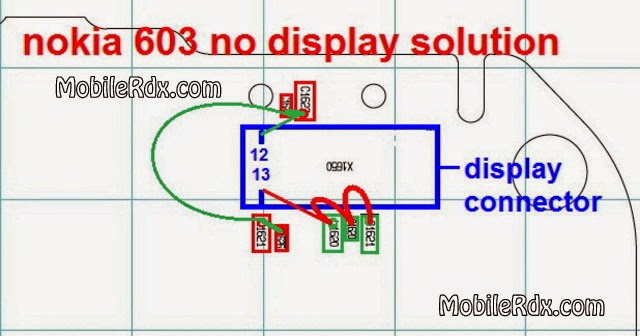
This post is for Nokia 603 Lcd Display Problem Solution. If your phone’s Display screen stops working solutions in the diagram below can help you.
Nokia 603 Blank Display Solution
Nokia 603 Display Connecter Ways
First Clean display connector in the similar way you did on-board connector.
Now check your entire motherboard for any traces of water damage, in case you find moisture on any part of the board clean it with the help of cotton cloth. Besides that you can also use blow dryer for few seconds in order to completely eliminate moisture from your phone.
Here Are Hardware Solution Please Obseve Carefully.
If you have further Questions please don’t hesitate to leave a comment.
Note: Every diagram we post on repair-mobiles.com is tested by one or more members of our team. Still Use them at Your Own Risk we are not responsible if these solutions may cause any harm to your phone.

Nokia 114 Full Display Ways Jumper Solution

Nokia 114 Display Track ways
Nokia 114 Lcd Jumper Solution
Nokia 114 White Display Problem
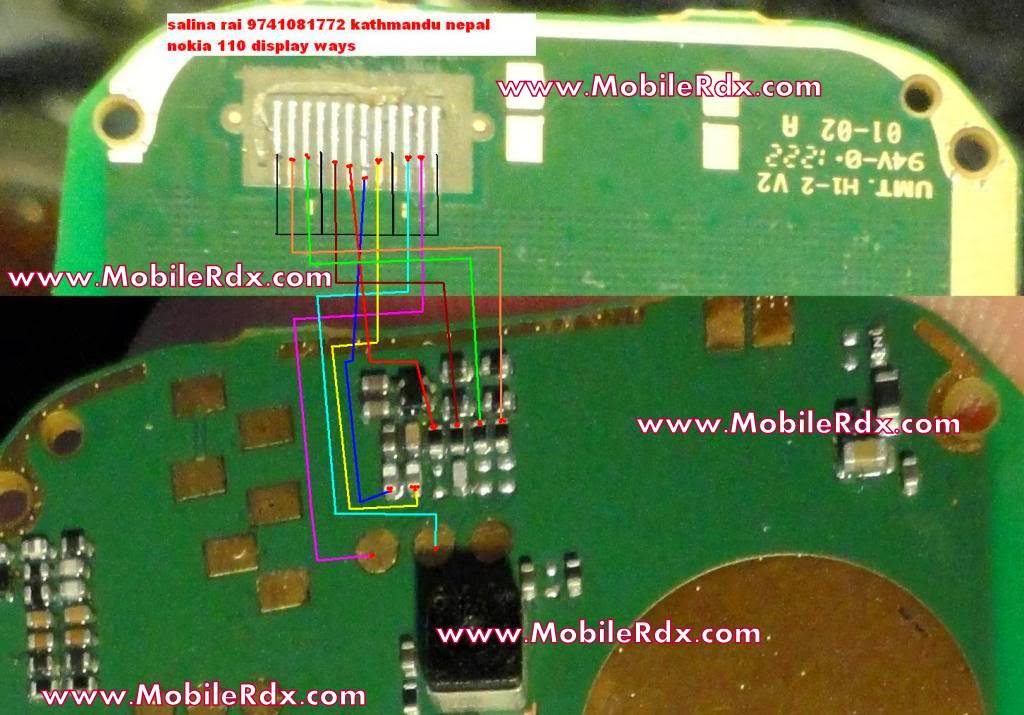
This article is for Nokia 114 White Display Problem Solution. If your phone’s LCD connector prints are damaged consult the diagram below. This solution works for nokia 114.
Having nokia 114 White Display Problem, I have marked display ways jumper points in this diagram. Only make these jumpers if necessary like if any of the prints are busted. If the LCD connector is in good shape replace the LCD itself.
Please Note that we will edit these solutions or add new ones if found in this page at any time in the future. So feel free to come back any time on this page to stay up to date.
Or
Nokia 114 Display Light Ways Solution Jumper
If you have further Questions please don’t hesitate to leave a comment.
Note: Every diagram we post on mobilerdx.com is tested by one or more members of our team. Still Use them at Your Own Risk we are not responsible if these solutions may cause any harm to your phone.
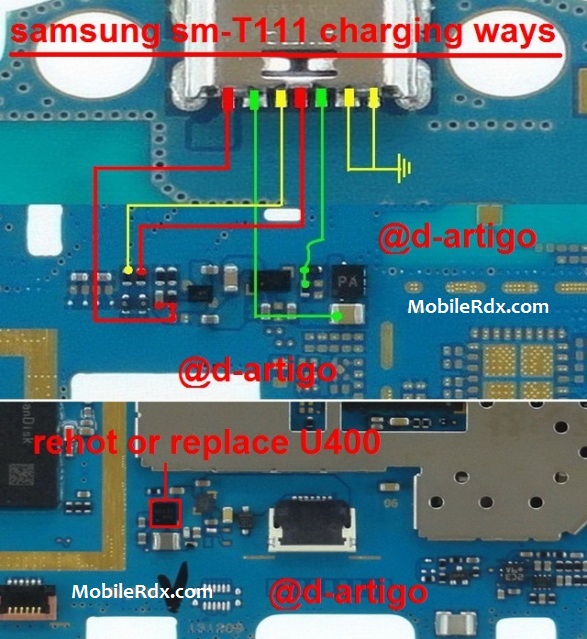
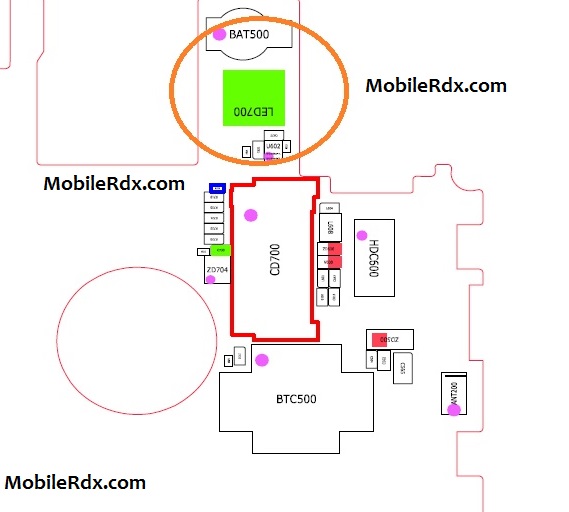
Samsung SM-T111 Charging Solution Ways Usb Jumper

The solution below will work if you already tried another working battery charger but still it doesn’t show any charging indication. This solution shows and called the Samsung SM-T111 charge jumper ways. Just refer to the solution below and locate the highlighted components on the Samsung Galaxy Tab 3 T111 PCB board.
Samsung SM-T111 Charging Solution Ways Usb Jumper
Here’s how to troubleshoot the Samsung SM-T111 charging problem:
1. First, try to use another working battery charger and replace the mobile phone’s battery.
2. Visually check the DC jack-pin connector for possible damaged, clean it or replace it if necessary.
3. Clean the DC jack-pin connector terminal contact pads on the PCB board and also the Battery connector.
4. Check the Fuse, Diode, coils and capacitors for possible short and open circuit.
5. Trace the charging positive and ground connection line paths.
6. The charging operation is controlled by the betty IC U400 Samsung Galaxy Tab 3 T111 , there are instances the you
Please Note that we will edit these solutions or add new ones if found in this page at any time in the future. So feel free to come back any time on this page to stay up to date.
If you have further questions please don’t hesitate to leave a comment.
Note: Every repairing solution posted here is tested by at least one member of our team. Use the information available here at Your Own Risk. We are not responsible if any harm comes to your device during the repairing process.
Samsung SM-T111 usb not charging, Usb not recognized, charging not save, not charging

Monday, August 24, 2015

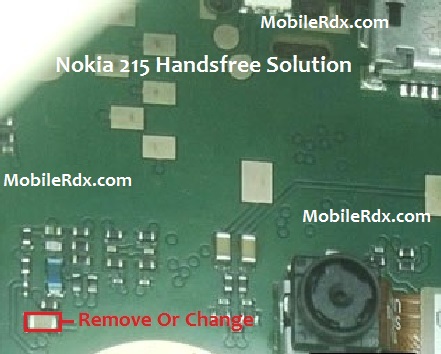
Nokia 215 Handsfree Headphone Mode Activated Solution

Nokia 215 Handsfree Headphone Mode Activated Solution
Nokia 215 Handsfree Activated Problem Repairing Solutions are available in the following article.Also you will find Nokia 215 Handsfree Solution Ways and Jumpers information in the diagrams further in this post.In Nokia 215 Handsfree Solution Activated problem can occur because of the faulty Handsfree Connector or it’s bad connection to the Cell Phone’s Motherboard. So first of all you should clean Nokia 108 Handsfree Connector Ways and Motherboard of the Mobile Phone. If that does not work then you can replace the Handsfree Connector.
Please Note that we will edit these solutions or add new ones if found in this page at any time in the future. So feel free to come back any time on this page to stay up to date.
Here Are Nokia 215 Handsfree Solution Activated Problem Diagrams. Please Observe Carefully.
Nokia 215 Handsfree Headphone Mode Activated Solution
Nokia 215 Headphone Pin Ways
Nokia 215 Handsfree Jumper Solution Repair
Nokia 215 Headphone Track Solution
Nokia 215 Handsfree Activated Problem Solution
Note: Every repairing solution posted here is tested by at least one member of our team. Use the information available here at Your Own Risk. We are not responsible if any harm comes to your device during the repairing process.

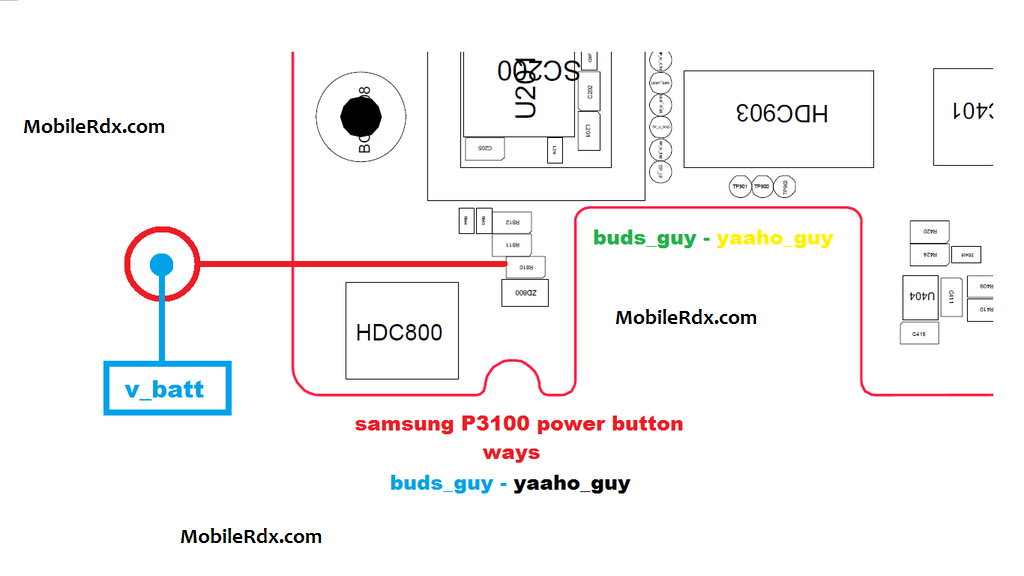
Samsung Galaxy Tab 2 P3100 Power Button Ways Solution

Samsung Galaxy Tab 2 P3100 Power Button Ways Solution Problem Jumper
This solution provides the connection line paths of the Samsung Galaxy Tab 2 7.0 GT-P3100 Power ON-OFF/END switch button key. This may help fix if the phone doesn’t tuns ON but it shows charging indication when the battery charger is plug-in.
Besides that, a problem in power button might also cause your phone to restart at times, which becomes very much annoying and it troubles you to the masses.
Just refer to the solution below and locate the highlighted components where the said power on off key is being connected.
Samsung Galaxy P3100 Power ON OFF Key Jumper Ways Solution
Samsung Galaxy Tab 2 P3100 Power Button Ways Solution
When it comes to hardware, the very first thing that you need to do is to re-solder power button strip and check its on-board connector for any loose contacts.
Samsung P3100 Power Button Ways Solution
The first step that should be done is certainly the damage caused on the power button on the phone can not turn on, to make sure the power button is broken, you can try charging or charging the phone whether it is charging or not. If you can try the second charging.
The second step you can check the track as in the picture above, check the lines one by one and also the resistor is connected on the power switch on, if there is a path-breaking try doing jumper carefully and thoroughly.
Damage or fault repairs caused by the existing solutions on this blog is not liable MobileRdx.com, we just want a little help you in improving your mobile phone.
Samsung Galaxy Tab 2 GT-P3100 Power Button,Power Key,Power Switch,On Off Button, On-Off Switch, Power Problem

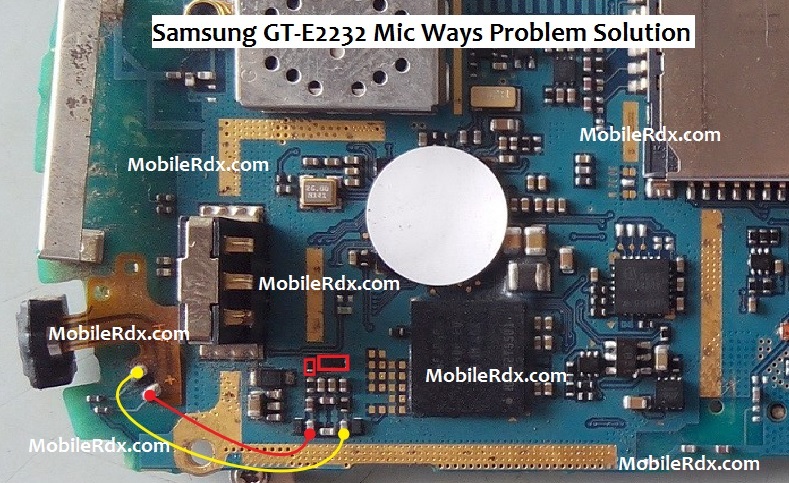
Samsung E2232 Mic Problem Jumper Ways Solution

Samsung E2232 Mic Problem Jumper Ways Solution
Samsung GT-E2232 Mic Solution Jumper Problem Ways Mic Not Working Microphone
To fix or repair mic problem on Samsung E2232, you may first check the microphone module using a multimeter or replace it with a new one to securely confirm that the microphone is still working or not damaged.
If the Microphone is okay, clean the mic’s terminal contact pads. Refer to the solution below and do some check and test procedures.
Here’s the Samsung GT-E2232 Solution for not working mic problem. This solution below shows the complete connection tracks of the microphone that can be used for deeper microphone problem troubleshooting.
Samsung E2232 Mic Problem Jumper Ways Solution
Repair tips:
a) Trace and check the supply lines paths of the microphone module.
b) Check and or replace the resistors highlighted on solution above, the two
A poor, garbled and saturated sound quality is also cause by a faulty components on that circuit, you may replace the resistors and capacitors in the MIC circuit.
If you have further questions please don’t hesitate to leave a comment.
Note: Every repairing solution posted here is tested by at least one member of our team. Use the information available here at Your Own Risk. We are not responsible if any harm comes to your device during the repairing process.
Samsung E2232,Mic,microphone,Solution,Jumper,Problem,Ways
Samsung GT-E2232,Mic,Microphone,Mic Problem,Mic Solution,Mic Jumpers,Mic Ways

Samsung GT-I8150 Display Light Problem Solution Jumper

Samsung GT-I8150 Display Light Problem Solution Jumper
Normally you don’t see Samsung Galaxy W GT I8150 led lights problems. In these smartphones led lights are placed inside the LCD so unless the LCD is damaged itself you won’t see a problem like this. So if your phone’s LCD is working fine but the led lights are not make sure the brightness in the phone is not set too low.
Please Note that we will edit these solutions or add new ones if found in this page at any time in the future. So feel free to come back any time on this page to stay up to date.
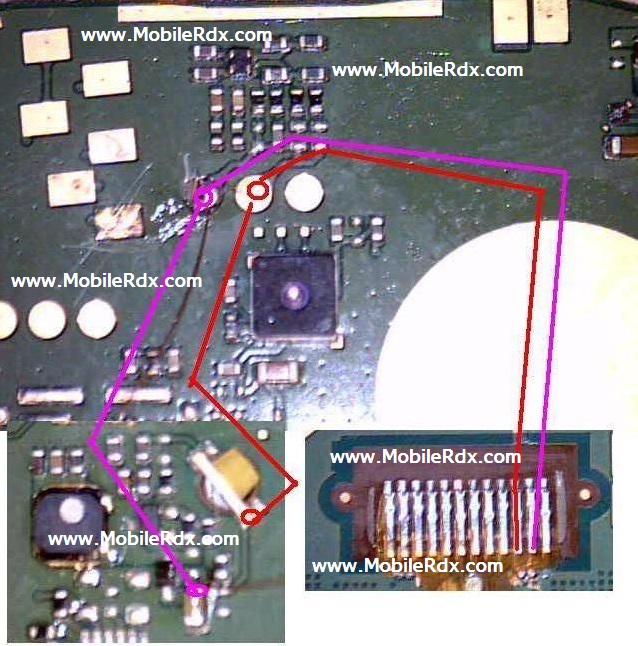
Here are Samsung GT-I8150 Led Lights jumper ways. Please study these diagrams very carefully before you start repairing.
Samsung GT-I8150 Display Light Problem Solution Jumper Ways
Now check both capacitors (Capacitor 1 and Capacitor 2) with their side’s first pin of display on-board connector. If any of them is faulty, replace them.
Now Check Continuity between +ve terminal of the battery with display IC’s first pin.
Check all the display IC capacitors for continuity, if any of them is faulty then change it.
If the above step fails then gently heat display IC and check, if it still fails then change it.
Note: Please note that even though every solution posted on our website is tested by one or more members of our team before posting, but still we do not take any responsibility for any damage it may cause to your cell phones. Use these repairing solutions at your own risk. Thank You.
Subscribe to our Free Channel
Samsung Galaxy W I8150 Display Light Solution,Lcd Light Not Working Problem, Repair Display Light On Samsung I8150 Phone, Display Light Ways,How To Repair Display Light Problem In Samsung GT-I8150, Lcd Light Jumper, Lcd Light Ways.